Text message opt-in
LavaEgg Scheduler, operated by LAVA EGG LLC. Web form and in-person opt-in. Last updated October 6, 2026.
This page explains the optional booking texts sent by LavaEgg Scheduler. It covers consumers who book with a business that uses LavaEgg Scheduler.
Who sends the texts
LavaEgg Scheduler, operated by LAVA EGG LLC, sends the texts from one shared number. Every appointment text starts with "LavaEgg Scheduler for" followed by the business name and a colon, for example "LavaEgg Scheduler for Example Business:". The business name in that prefix is the business the booking is with. LavaEgg Scheduler is the sender. Automatic replies to HELP, STOP and START are one fixed text for the whole shared number, so they begin with "LavaEgg Scheduler:" without a business name.
A client business does not write or send the messages. In the examples below, Example Business is a placeholder for the business the customer is booking with. LavaEgg Scheduler is the sender.
What texts are sent
Texts are transactional only. They are booking confirmations, reminders, and changes or cancellations, plus the opt-in confirmation and replies to HELP, STOP, and START. No marketing messages are sent.
The texts are about that appointment: confirmation, reminder, and a change or cancellation.
How often
Message frequency varies, usually 2-4 messages per booking.
Message and data rates
Message and data rates may apply.
STOP, START, and HELP
Reply STOP to opt out. Reply STOP to cancel at any time. Because all LavaEgg Scheduler texts come from one number, STOP ends texts about bookings with every business that uses LavaEgg Scheduler. STOP is number-wide.
Reply START to resubscribe. START or UNSTOP fully undo the block.
Reply HELP for help. Help is at https://lavaeggscheduler.com/help and [email protected].
Consent is not a condition of booking. You can finish booking without giving new SMS permission.
Questions: [email protected]. LAVA EGG LLC, 569 Chambers Street, Spencerport, NY 14559.
How consent is collected
When appointment texts are offered and a customer supplies a phone number, the Review step names the business and phone number. In the future-appointment consent flow, the optional box says "Yes, text me about this and future appointments". The single checkbox starts unchecked and is optional. Leaving it unchecked gives no new permission; valid existing approval for the same business, customer, phone number and sender can still cover the appointment. A phone number alone is not consent. Booking is available without texts, and email and voice permission remain separate.
The future-appointment notice reads: "LavaEgg Scheduler (LAVA EGG LLC) sends confirmations, reminders, changes and cancellations for this and future appointments with Example Business to (555) 010-0100. Message frequency varies. Message and data rates may apply. Reply STOP to stop all texts from this shared LavaEgg Scheduler number, or HELP for help. Texts are optional; you can book without them." The business and number reflect the customer's review. Links to the Privacy Policy and SMS Terms appear with the notice.
Approval remains limited to appointment messages for that business, customer, phone number and sender until withdrawn or opted out. A changed number needs new approval. Leaving the checkbox unchecked does not withdraw existing approval; reply STOP to stop texts from the shared sender. An explicitly reviewed business policy may recognize an attributed prior customer-screen approval as covering future appointments when that scope was communicated. The original answer, disclosure, actor and time remain unchanged; missing answers and contact details alone never grant permission.
Historical screenshot of the booking page
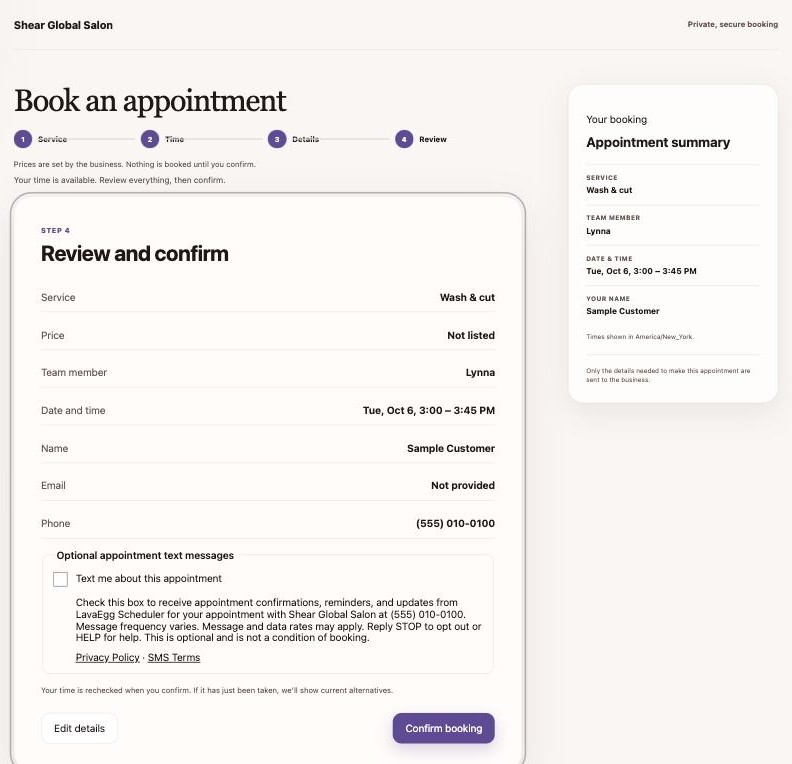
The notice next to the checkbox reads: "Check this box to receive appointment confirmations, reminders, and updates from LavaEgg Scheduler for your appointment with Shear Global Salon at (555) 010-0100. Message frequency varies. Message and data rates may apply. Reply STOP to opt out or HELP for help. This is optional and is not a condition of booking." It is followed by links to the Privacy Policy and SMS Terms.
The dated screenshot shows Shear Global Salon as an example. On each business's booking page, the notice uses the name of the business the customer is booking with and the phone number the customer entered. LavaEgg Scheduler, operated by LAVA EGG LLC, is the sender.
In person at the business
Staff can open the customer-present consent form inside Scheduler from the customer record or appointment. No separate browser tab is required. The form names the business and phone number and asks the customer to approve texts for this and future appointments, with the notice and policy links shown above. Approval is saved for that business, customer, phone number and shared sender until withdrawn or opted out.
When staff have already chosen to save a new appointment, submitting the customer's answer completes that save after current approval is checked. A form opened from a saved appointment or customer record does not change the appointment. Closing or leaving the form unanswered grants no permission. Customers may book without texts. Valid saved approval avoids another consent request for each appointment. A customer who has replied STOP is not asked to approve through the booking prompt; texts remain off until the sender's opt-in requirements are satisfied.
Older appointment-only forms
Older staff forms ask: "Would you like to receive text confirmations, reminders and updates from LavaEgg Scheduler for your appointment with Example Business?" Their appointment-only notice reads: "LavaEgg Scheduler (LAVA EGG LLC) sends confirmations, reminders, changes and cancellations for your appointment with Example Business to (555) 010-0100. Message frequency varies. Message and data rates may apply. Reply STOP to stop all texts from this shared LavaEgg Scheduler number, or HELP for help. Texts are optional; you can book without them." Future reuse of a prior answer requires the explicit reviewed historical scope described above; the original record is retained.
Sample messages
These samples show the shape of a message. They are illustrations, not live links. Example Business is a placeholder for the business the appointment is with; LavaEgg Scheduler is the sender. That name is in the prefix: every appointment text sample starts with "LavaEgg Scheduler for Example Business:".
LavaEgg Scheduler for Example Business: Your appointment is confirmed for Tue Oct 6 at 3:00 PM. Reply HELP for help, STOP to opt out.
LavaEgg Scheduler for Example Business: Reminder: Haircut tomorrow, Tue Oct 6 at 3:00 PM. Reply STOP to opt out.
LavaEgg Scheduler for Example Business: Your appointment on Tue Oct 6 at 3:00 PM was moved to Thu Oct 8 at 1:00 PM. Reply STOP to opt out.
LavaEgg Scheduler for Example Business: Your appointment on Tue Oct 6 at 3:00 PM was cancelled. Reply STOP to opt out.
LavaEgg Scheduler for Example Business: You're signed up for texts about your bookings. Msg frequency varies, usually 2-4 per booking. Msg & data rates may apply. Reply HELP for help, STOP to opt out.
HELP, STOP, and START
These replies are sent automatically and are the same for every business, because all LavaEgg Scheduler texts come from one number. They start with "LavaEgg Scheduler:" and do not name a business.
LavaEgg Scheduler: Booking texts from LavaEgg Scheduler (LAVA EGG LLC). Help: [email protected] or https://lavaeggscheduler.com/help Msg frequency varies. Msg & data rates may apply. Reply STOP to opt out.
On a toll-free number, the carrier network sends the STOP reply, so a custom STOP text may not display. If one can be set, it would be:
LavaEgg Scheduler: You're unsubscribed from all LavaEgg Scheduler texts. No more messages will be sent. Reply START to resubscribe.
LavaEgg Scheduler: You're resubscribed to booking texts. Msg frequency varies. Msg & data rates may apply. Reply HELP for help, STOP to opt out.